If you are printing postage, buy the Rollo Wireless. If you are labelling shelves, cable ends, files and pantry jars, buy the Brother P-Touch PT-D610BT. Those two answers cover most people. The other three picks here are for the buyers they fail: someone packing orders where the Wi-Fi does not reach, someone who wants the same durable tape without paying for Bluetooth, and someone who wants a labeller that lives in a drawer and works without an app.
Roll-fed shipping printers
| Model | Label media | Print resolution | Rated print speed | Connectivity |
|---|---|---|---|---|
| Rollo Wireless | Direct thermal roll, 4 x 6 in shipping format | 203 DPI | 150 mm/s | Wi-Fi, USB, AirPrint |
| MUNBYN RW403B | Direct thermal roll, 40–108 mm label width | 203 DPI | 150 mm/s | USB and Bluetooth; Bluetooth version not published |
The two groups are separated because the numbers are not the same measurement. A roll-fed shipping printer is rated in millimetres per second across a continuous direct-thermal roll at a single resolution figure; a tape-cassette label maker prints a short strip from a sealed TZe or LT cartridge and is rated, when it is rated at all, on two axes. Reading 203 DPI against 180 x 360 dpi, or a roll width against a tape width, compares nothing.
Tape-cassette label makers
| Model | Tape media | Print resolution | Connectivity | Power |
|---|---|---|---|---|
| Brother P-touch PT-D610BT | Brother TZe cassettes | 180 x 360 dpi | USB and Bluetooth | AC adapter AD-E001A; Brother’s page does not make clear whether it ships with the base unit |
| Brother P-touch PT-D220 | Brother TZe cassettes | Not published | None | AA batteries |
| DYMO LetraTag 100H Plus | DYMO LT cassettes, 12 mm | Not published | None | Four AA alkaline batteries, 6 V DC, not included |
Two different machines, one search term
A tape-cassette label maker takes a sealed cartridge of narrow tape — 3.5mm to 24mm on the widest machine here, 12mm on the cheap ones — and prints a strip you peel and stick, typed on the device itself. A 4×6 thermal shipping printer takes a four-inch roll of heat-sensitive stock and prints whatever PDF the carrier hands it, at 203 dpi, in about a second. It has no keyboard and no screen. Neither can do the other’s job: a cassette labeller physically cannot produce a 4×6 shipping label, and a shipping printer cannot produce a 9mm strip for a switch plate. Buying across that line is the most common way this purchase goes wrong.
If you are printing shipping labels
Best for shipping: Rollo Wireless Shipping Label Printer
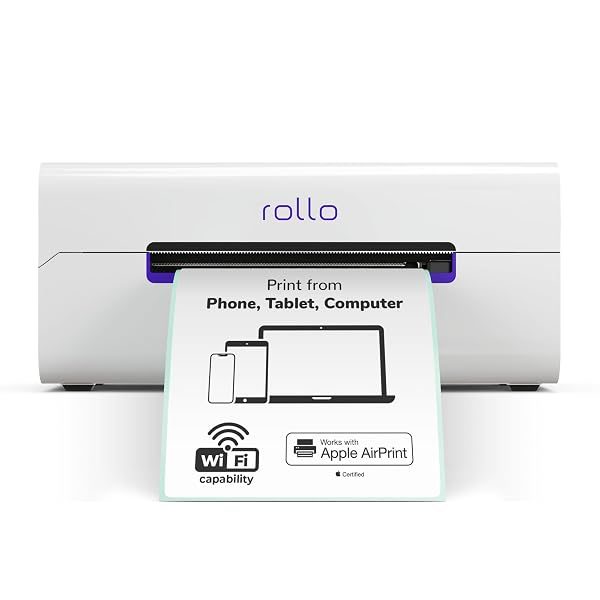
This is the machine high-volume sellers standardise on, and the case for it is boring in the way good equipment is boring: 203 dpi, widths from 1.57 to 4.1 inches, roughly 150mm per second, which is about a label a second with no warm-up and no ink to run out of mid-queue. It joins Wi-Fi and supports AirPrint, so a Mac needs no driver at all — worth knowing, because Rollo’s USB model does require one. Rollo rates the mechanism at around 650,000 labels; that is their figure, not one we can check. The complaint that recurs across its reviews is specific enough to take seriously: the printer dropping off the Wi-Fi network and needing to be found again. If your router already loses devices, plan on USB.
Typically: $250–$325 | Retailer: Amazon
Best for packing away from a desk: MUNBYN Bluetooth Thermal Label Printer
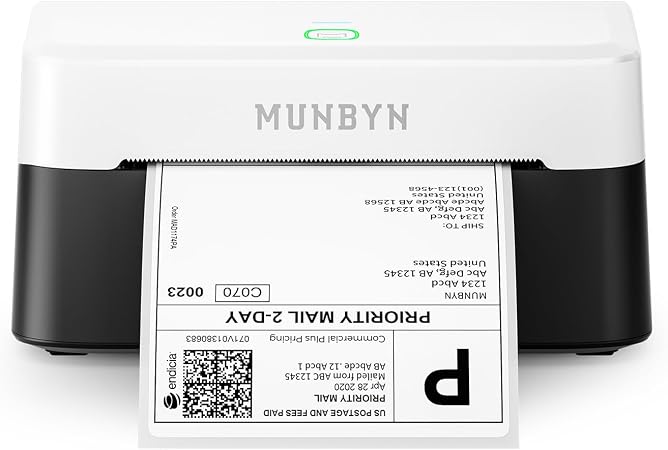
The RW403B matches the Rollo where it counts — 203 dpi, about 150mm per second — and takes slightly wider stock at 1.57 to 4.25 inches, covering 4×6 postage, 3×2 product labels and 2×1 barcodes off one machine. What separates it is that it leads with Bluetooth rather than Wi-Fi, pairing straight to a phone instead of joining a network. That is the only reason to choose it, and a good one if you pack in a garage or storage unit where the network does not reach. The trade is the Rollo’s in mirror image: Bluetooth dropping mid-print rather than Wi-Fi dropping between jobs. One caveat — MUNBYN’s list of supported platforms (ShipStation, Pirate Ship, Shopify, Etsy, eBay) is MUNBYN’s own claim, not something we have seen independently tested.
Typically: $60–$80
Retailer: Amazon
If you are labelling the things around you
Best overall label maker: Brother P-Touch PT-D610BT
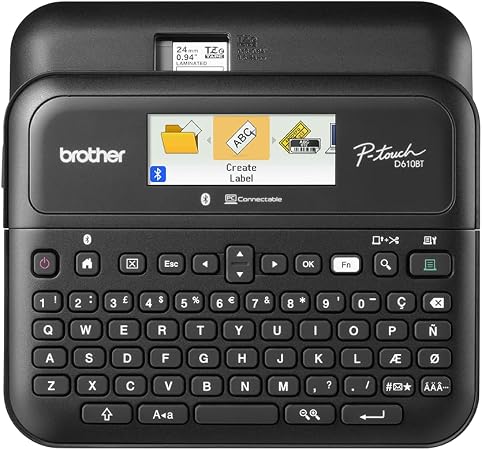
The spec that earns this its place is tape width: TZe cassettes from 3.5mm up to around 24mm, where the cheap machines stop at 12mm. That is the difference between labelling a cable and labelling a tote you need to read across a room. It prints at 180 x 360 dpi behind a 20-character, two-line graphical preview, so you see the layout before the tape is cut rather than after. Bluetooth is the other reason to spend up: anything with a barcode, a logo or a typeface you own has to arrive from somewhere else. Two warnings. Brother’s Mac software is the weak half of the package, and Mac pairing trouble is the most common theme in this model’s reviews. And the Amazon listing contradicts itself on power: the box-contents bullet lists the label maker alone, the description prose says an AC adapter is included. Check at purchase — running a 24mm machine off six AA cells is short-lived. Weighing a spec like tape width more heavily than the ones printed biggest on the box, because it actually predicts real-world performance, is the approach set out in How We Pick.
Typically: $100–$130
Retailer: Amazon
Best cheap labeller with a keyboard: Brother P-Touch PT-D220
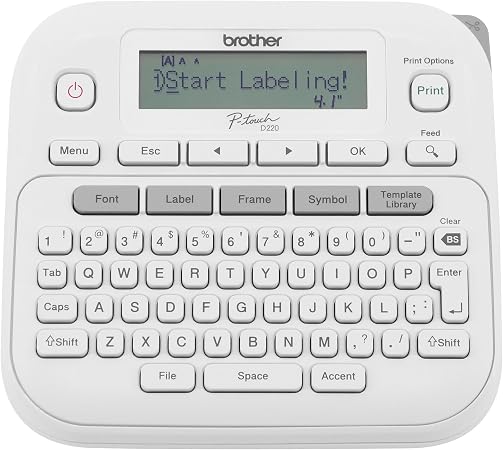
The D220 is slower and narrower — 180 dpi, around 20mm per second, tape capped at 12mm, a 15-character single-line display — and has no wireless anything. Buy it anyway if the D610BT is more machine than your house needs, because what decides whether a label is still readable in four years is the tape, not the printer, and the D220 eats the same laminated TZe cassettes. You give up width and convenience, not durability. Its two annoyances are both well documented: it runs on six AAA cells with the AC adapter sold separately, reliably the top complaint from buyers who assumed otherwise, and the display is hard to read in a dim garage or cupboard, which is exactly where you use it.
Typically: $40–$50
Retailer: Amazon
Best drawer-friendly handheld: DYMO LetraTag 100H Plus
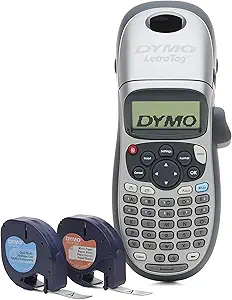
The LetraTag’s whole argument is that it asks nothing of you. No app, no pairing, no driver, no network: a 12mm LT cassette in the back, a 200 dpi thermal head, four AA cells, type and print. The LetraTag 100H Plus bundle ships with two cassettes — black-on-white paper and black-on-clear plastic — and a magnetic holder, so it sticks to a filing cabinet instead of vanishing into a drawer. Two limits. LT tape is not TZe tape: different cassette, different construction, not interchangeable with either Brother here. And the complaint that comes up most consistently in its reviews is adhesion, with labels not staying stuck on curved or textured surfaces. For anyone who has read about DYMO’s label DRM: that is a LabelWriter 550-series problem and does not apply to this machine.
Typically: $25–$35
Retailer: Amazon
The tape is the product
Brother’s TZe tape is laminated, and the word is doing real work: the text is printed onto a film and sealed under a clear over-laminate, so the printed layer is sandwiched rather than exposed. That is why a TZe label survives scrubbing, freezing, sunlight and a dishwasher top rack, and why Brother rates the tape across roughly minus 30C to 100C. LetraTag LT tape is not laminated — a thermal-printed strip with adhesive behind it and nothing in front. Both will label a filing box; only one should still be legible on a chest freezer in three years — an inference from how the tapes are built rather than a documented pattern of LetraTag failures, which we looked for and did not find. The economics run the other way: per square inch of printable surface, narrow cassette tape costs on the order of fifty times what bulk 4×6 thermal stock does, on our own estimate from retail pricing. Cassette tape is for labels meant to outlive the thing they are stuck to; thermal stock is for labels binned on delivery.
What we left out, and the one to be careful with
The DYMO LabelWriter 550, 550 Turbo and 5XL are the machines to think twice about. They read an RFID tag in the core of genuine DYMO rolls and refuse to print without it, so third-party stock is locked out by design and you are tied to one supplier for the life of the printer. That is specific to the 550 series — the LetraTag above is unaffected, and the older LabelWriter 4XL predates the system and still takes generic four-inch labels, which is most of why it stayed popular with sellers. Zebra’s ZSB line is discontinued and used a proprietary cartridge, so a cheap second-hand one is a dead end. The Brother QL-1110NWB is the real alternative to the Rollo if you would rather stay inside Brother’s software. And the pocket printers from NIIMBOT and Phomemo are tempting, but the recurring complaints are not about print quality — they are about app pairing and template content sitting behind in-app purchases.
Two recent changes are worth a check before you buy. Windows 11 dropped support for legacy V3 and V4 printer drivers in a January 2026 update, so a printer whose only Windows support is an old driver package can now fail to install — a real risk second-hand, not for the current machines here. And carriers have tightened barcode scan-quality tolerances at automated sort hubs, so a faint label that would have passed a few years ago can get pulled for manual handling. Direct thermal fades with heat and light, which makes the fix a habit rather than a purchase: print close to when the parcel actually goes out.
More Buying Guides
- Best Office Chairs 2026: 5 Picks and the Seat Height Spec That Decides Fit
- Best 3D Printer 2026: 5 Picks Across Bambu Lab, Prusa, Elegoo and Creality
- Diode Laser Engravers for a Home Workshop: Enclosed or Open-Frame, and Which to Buy
- Best Filament Dryers in 2026: 5 Picks by Spool Count, Heat and Noise
Leave a Reply