For most people the right mechanical keyboard is the Keychron K10 Max Wireless Mechanical Keyboard: a full-size board that connects three ways and arrives with the acoustic work already done. A mechanical keyboard is one of the few upgrades you feel every single minute you use the computer, and it is also one of the easiest to get wrong. The switch inside, the layout size, and whether it can be modified later are the three things that actually decide whether you like it, and none of them are usually what the product listing leads with. Here are four picks built around the situations people actually shop from — one board that does everything, competitive gaming, a first mechanical on a budget, and a desk with no room to spare — each checked against the manufacturer’s own spec sheet or an independent listing, not just the sales copy.
| Model | Layout and key count | Stock switch | Hot-swap sockets | Connection modes |
|---|---|---|---|---|
| Keychron K10 Max | 108 keys, 100% ANSI | No default published; one of six chosen at purchase, Red, Brown or Banana in each of the Super and Apex lines | Sold both ways; hot-swappable and non-hot-swappable versions are separate options at purchase, and socket pin count is not published | 2.4 GHz, Bluetooth 5.1 to three devices, USB-C wired |
| HyperX Alloy Origins 65 | 65% form factor; key count not published | HyperX Aqua or HyperX Red, fixed to the SKU rather than chosen after purchase | Not published | Detachable USB-C wired only |
| Redragon K671KS | Not published | Not published | Not published | Not published |
| AULA F75 Pro | 81 keys, 75% layout | Pre-lubed Reaper, linear | Yes, 3-pin and 5-pin | 2.4 GHz, Bluetooth 5.0, USB-C wired; paired-device count not published |
Switch type is the one thing you can’t easily undo
Decide on switch type before anything else, because unless the board has hot-swappable sockets it’s the only decision here you’re stuck with. Linear switches, like the pre-lubed Reaper switches in the AULA pick below, travel straight down with no feedback and are the default for gaming, where a consistent, interruption-free press matters more than tactile feel. Tactile switches add a small bump partway down that tells your finger the keypress registered, and most people prefer them for long stretches of typing; on the Keychron, Brown and Banana are the tactile choices, though Keychron ships no default switch at all and makes you pick one at checkout. Clicky switches add an audible click on top of that bump and will make you genuinely unpopular in a shared room or on a video call — none of the picks here list a clicky switch among the options their makers publish, and that’s deliberate.
Hot-swap buys you a second chance
Hot-swappable sockets let you pull the stock switches and press in a different 3-pin or 5-pin switch with no soldering iron. That matters most if you’re not sure which switch feel you want yet: buy a hot-swap board and a cheap switch variety pack, and you can try linear, tactile, and clicky in an afternoon instead of guessing right the first time. Of the picks below, only the AULA publishes hot-swappable 3-pin and 5-pin sockets as a property of the board itself. Keychron sells the K10 Max in both hot-swappable and non-hot-swappable versions, so there it is a box to tick at checkout rather than something the model gives you. HyperX makes no hot-swap claim in either direction for the Alloy Origins 65, and Redragon publishes no specification for the K671KS at all — in both cases that is a gap in what the maker states, not a finding that the switches are fixed. Calling out a feature like hot-swap sockets only when it actually changes what you can do with a board later is the standard behind How We Pick.
Layout size trades keys for desk space
A full-size layout, like the Keychron K10 Max’s 108 keys, keeps the number pad, which is non-negotiable if you touch spreadsheets or invoices regularly and something most enthusiast keyboards quietly drop. Trimming down to 75%, like the AULA F75 Pro’s 81 keys, keeps the full function row and a real arrow cluster while cutting the number pad and most of the dead space between clusters. Going further to 65%, like the HyperX Alloy Origins 65, drops the function row too, freeing up several inches of desk for your mouse hand — exactly why it’s a common competitive-gaming layout despite hiding the function row behind a modifier key.
Wired, 2.4GHz, and Bluetooth aren’t interchangeable
The HyperX is wired-only over detachable USB-C, the right call for competitive play: no dongle to lose and no battery to manage mid-match. The Keychron and the AULA both run tri-mode, and the Redragon’s listing describes the same three modes although Redragon publishes no specification of its own — a 2.4GHz dongle for the lowest-latency wireless connection, Bluetooth for switching between multiple paired devices with no dongle at all, and USB-C wired as a fallback or for charging. If you’re gaming competitively, plug in. If you’re moving one keyboard between a laptop, a tablet, and a desktop, the wireless modes are what you’re actually paying for.
The four picks
Best Overall: Keychron K10 Max Wireless Mechanical Keyboard
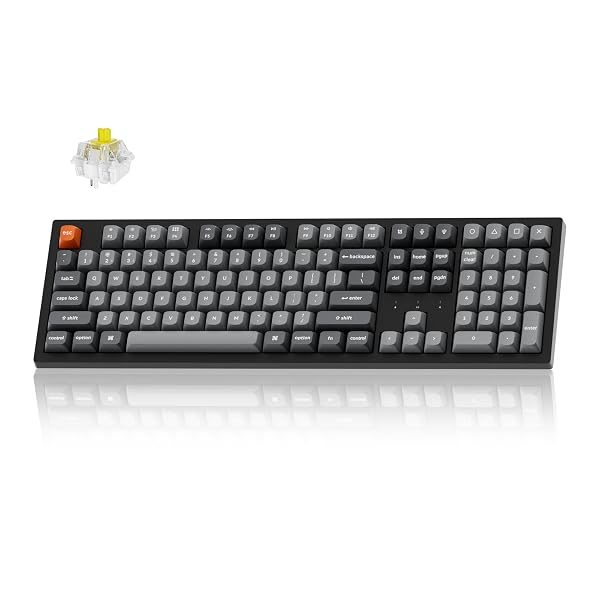
The K10 Max is a full 108-key layout with three ways to connect: a 2.4GHz dongle at a 1000Hz polling rate, Bluetooth 5.1 across up to three paired devices, or USB-C wired. There is no default switch: Keychron makes the choice a required step at checkout, from six options across its Super and Apex lines in Red, Brown and Banana. Hot-swap is a checkout choice here too rather than standard, so if you want to change switches later, check you are buying the hot-swappable version.
Keychron builds in the acoustic work that used to be an aftermarket project: IXPE and EPDM foam, a steel plate, screw-in stabilizers, and double-shot PBT keycaps that resist going shiny. It remaps through a browser-based QMK app, with both Mac and Windows keycaps in the box. The tradeoff is bulk — this is a wide, heavy board that pushes your mouse further out on a shallow desk.
Typically: $100–$140 | Retailer: Amazon
Best for Gaming: HyperX Alloy Origins 65 Mechanical Gaming Keyboard
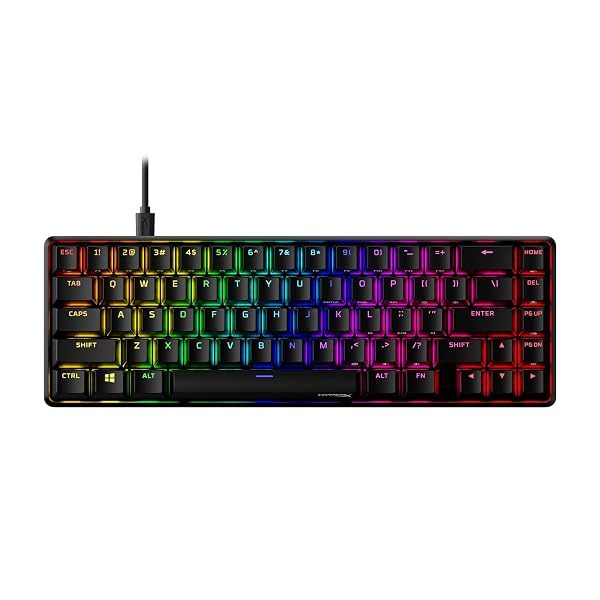
For competitive shooters, a 65% layout buys elbow room by dropping the number pad and function row, moving your mouse hand several inches closer to your body. The Alloy Origins 65 ships with HyperX Aqua switches, which HyperX sells as tactile while its own switch specification on the same page gives an operation style of linear — that contradiction is HyperX’s, and it is flagged under the table above rather than resolved here. It is wired over a detachable USB-C cable, so there’s no dongle to lose and no battery to die mid-match.
The body is full aluminum with effectively no flex, and the double-shot PBT keycaps keep their texture instead of polishing smooth. HyperX does not publish whether the switches are hot-swappable, so treat the switch you order as the one you are likely to keep, and the missing function row is one modifier-key press away rather than a dedicated row.
Typically: $60–$80 | Retailer: Amazon
Best Budget: Redragon K671KS Wireless Mechanical Keyboard
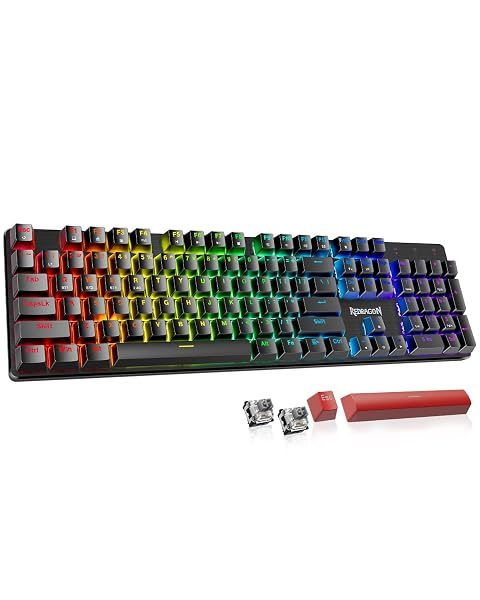
Redragon publishes no product page for the K671KS on either of its own sites — the only thing either site carries under that name is a driver download page, which pictures the board but lists no specifications. So unlike every other pick here, what follows comes from the retail listing and cannot be checked against the manufacturer. The listing describes a tri-mode board — USB-C, Bluetooth, or 2.4GHz, chosen with a physical switch on the back rather than a key combination — with hot-swappable 3-pin sockets, a metal top panel, and double-shot PBT keycaps, and eight spare switches and two spare keycaps in the box, a genuinely useful inclusion for a first mechanical keyboard: swap a handful of keys, type on them for a week, and find out what you actually prefer before committing to a full set.
Onboard macro editing works with no background app running. What you give up at this price is acoustic engineering — expect a hollower sound than a foam-tuned board, though a strip of shelf liner in the case closes more of that gap than you’d expect for the price of a sandwich.
Typically: $35–$50 | Retailer: Amazon
Best for Small Desks: AULA F75 Pro Wireless Mechanical Keyboard
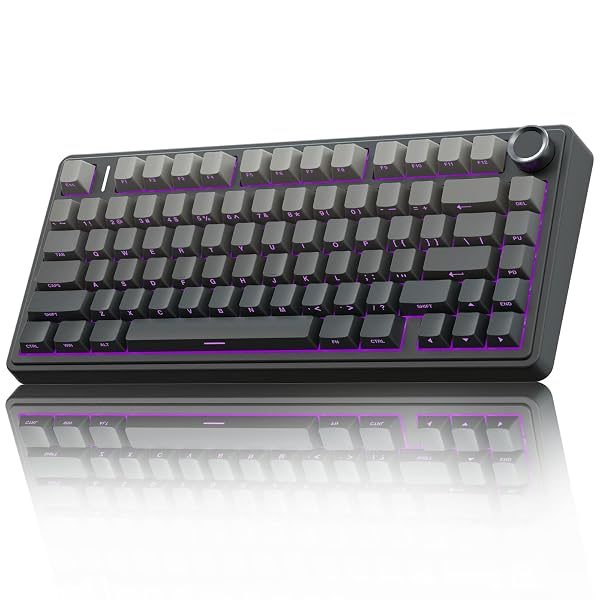
The 75% layout keeps the full function row and a real arrow cluster in a board that takes up about as much desk as a hardback book. The F75 Pro ships with linear Reaper switches, hot-swappable for 3-pin or 5-pin replacements, over a gasket-mount build with layered PORON and IXPE foam and per-key PCB slotting that lets each switch flex independently — the combination that gives it a deeper, damped sound rather than a rattly one.
An aluminum knob in the corner handles volume, media playback, and lighting brightness. The one thing to plan around: the keycaps are side-printed, so the legends never wear off, but the top of every key is blank — an adjustment if you don’t already touch type.
Typically: $60–$80 | Retailer: Amazon
If you still aren’t sure which switch feel you want, that’s what the hot-swap boards above are for — a cheap switch variety pack and ten minutes with the puller in the box beats buying the wrong keyboard twice. Last updated: September 13, 2026.
Leave a Reply